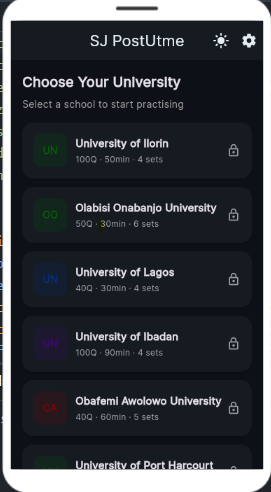
CBT Practice Mode
Practise in a real CBT environment identical to your school's PostUTME interface. No surprises on exam day.
Stop guessing. Start practising the exact patterns your school repeats every year. Over 15,000 students have gained admission using this app.
Select your university and get access to school-specific past questions, repeated patterns, and strategies used by top-scoring students in 2026.
Built specifically for Nigerian PostUTME. The best app for post UTME past questions gives you a real advantage on exam day.
Practise in a real CBT environment identical to your school's PostUTME interface. No surprises on exam day.
Access thousands of verified post UTME past questions that Nigerian universities repeat every year. Study what actually matters.
No internet needed. Study anywhere. Download the post UTME app once and practise forever on Android or iPhone.
Every question has a clear step-by-step explanation so you truly understand the answer, not just memorise it.
Simulate real exam pressure with countdown timers matching your school's exact PostUTME time limit.
Your personal AI identifies weak areas and builds a daily study plan tailored to your school's PostUTME exam.
Track daily progress. Know your score trends, weak topics, and exactly how much you have improved after question.
New practice questions added every week — even on the free plan. Always fresh, always relevant.
The app looks and feels exactly like a real PostUTME CBT exam. Practise the interface, not just the content.
Works on Android and iPhone. Takes less than 2 minutes to set up and start practising.
Click the Android or iPhone button to begin your free post UTME app download.
Android: Settings → Security → Unknown sources. Then open the downloaded APK file.
Open the app, select your school, and start practising PostUTME CBT questions immediately — offline.
Upgrade to Student Package to unlock your school's full question bank and AI features.
"I downloaded this app 2 weeks before my Unilorin PostUTME. I practised the repeated questions daily and scored 79. The questions in the app were almost identical to what came out in the real exam."
"The Supervisor identified exactly which topics I was weak in. I focused there and scored 23 in my Unilag PostUTME. The pattern-based approach is what makes this the best app for post UTME past questions."
"I scored 19 in my first UI attempt. After using SJ POST UTME and understanding UI's question patterns, second attempt — 76. One change in how I prepared changed everything. Every UI aspirant needs this app."
Start free. Upgrade when ready. No hidden charges. Best post UTME app for Android and iPhone.
Discount expires in:
Tester Package
₦899
No payment required
Student Package
₦3,990
One-time payment · Lifetime access
Tutor / Café Package
₦9,500
One-time · 4 activation codes
PostUTME exams are conducted as CBT at official university centres, not from home. SJ POST UTME lets you practise the exact CBT interface offline — so you walk in prepared on exam day.
SJ POST UTME is Nigeria's highest-rated CBT practice app for PostUTME in 2026 (4.82 stars). It provides school-specific past questions, AI Supervisor mode, real exam interface, and timed practice all in one free app.
Yes. SJ POST UTME is completely free to download for Android and iPhone. The free Tester Package gives 50 questions per week. Upgrade to Student Package (₦2,500) for full access to your school's complete question bank and AI features.
Yes. SJ POST UTME is available as a direct APK download for all Android phones. Tap the Android button, allow installation from unknown sources in Settings, and install the APK file. It also works on iPhone via the iOS link.
SJ POST UTME ranks as the best app for post UTME past questions in Nigeria for 2026. Unlike random PDF downloads, it organises past questions by school, year, and subject with explanations, and focuses on repeated question patterns universities actually use.
1. Tap Android download and save the APK. 2. Go to Settings → Security → Unknown sources and enable it. 3. Open Downloads, tap the APK, then tap Install. 4. Open the app and select your school. If blocked: Settings → Apps → Special app access → Install unknown apps, allow your browser, tap again.
Yes. SJ POST UTME works fully offline after installation. Practise post UTME past questions, take timed tests, and review answers anywhere without internet.
SJ POST UTME currently covers Unilorin, Unilag, University of Ibadan (UI), Uniport, OAU and OOU. More schools are being added regularly.
After transferring to the bank details shown in the payment section, use the contact button in the payment modal to send your payment screenshot. Our support team will send your activation code promptly.